
ตัวอย่างฟรี · ดูคำสั่งเต็ม คัดลอก และปรับข้อมูลได้โดยไม่ต้องสมัครสมาชิก
ทำแบนเนอร์ชวนแวะคาเฟ่
แบนเนอร์เว็บไซต์แนวนอน
ตัวอย่างแนวงาน
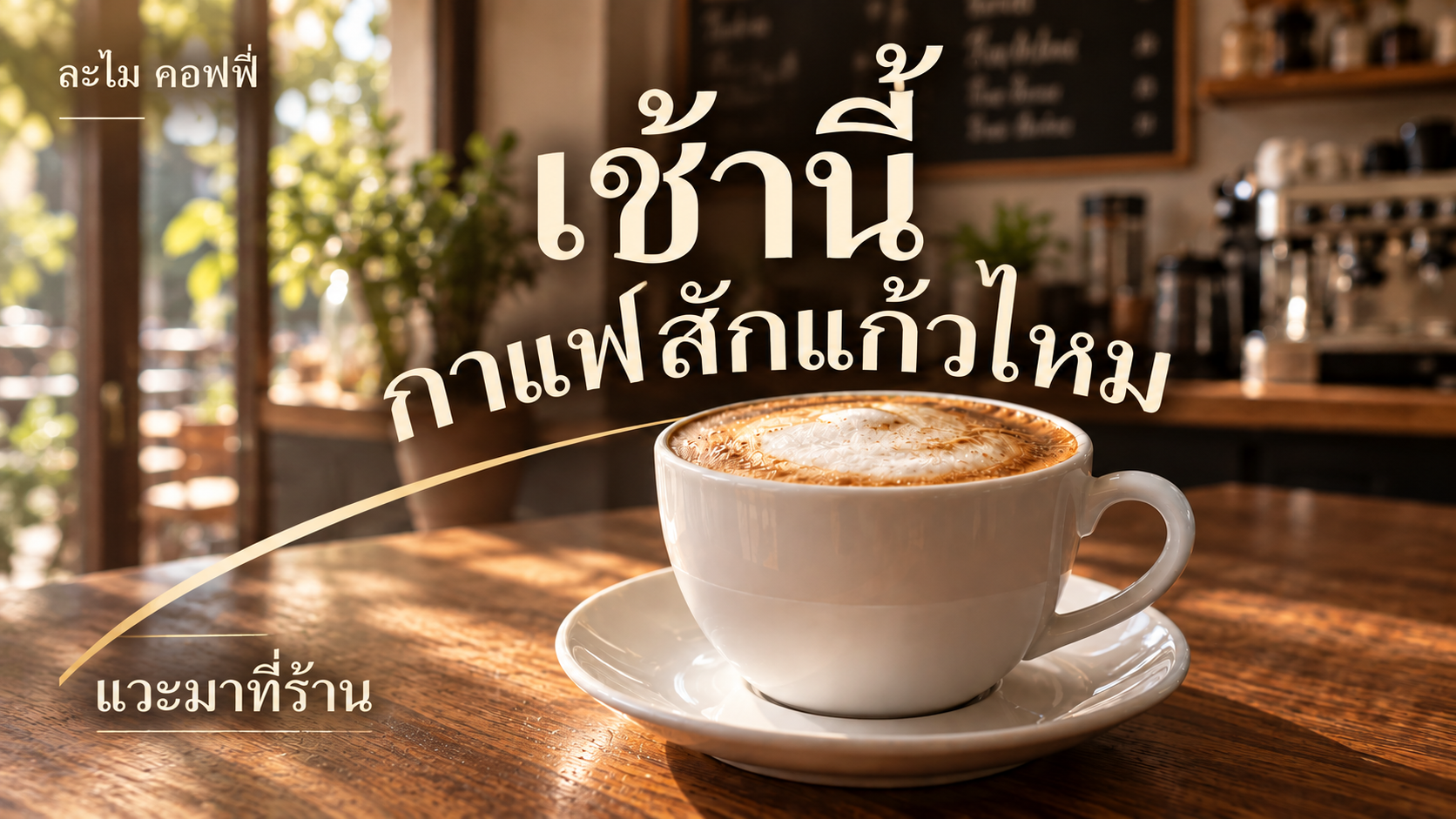
ละไม คอฟฟี่ เปิด 08.00–17.00 น. แวะมาที่ร้าน • ร้านและเวลาเป็นข้อมูลสมมติ
ตัวอย่างผลลัพธ์
งานนี้ใช้ทำอะไร
แบนเนอร์เว็บไซต์แนวนอน
รูปสินค้าของคุณ
เตรียมรูปสินค้าหรือภาพถ่ายของคุณที่ยังไม่มีราคา โปรโมชัน หรือกราฟิกโฆษณา ไม่ใช้ภาพงานตัวอย่างแทนรูปสินค้าจริง
ภาพนี้ให้ดูแนวกราฟิกและการจัดวาง งานของคุณจะเปลี่ยนไปตามข้อมูลและรูปที่ใช้
เอาแนวนี้ไปใช้กับงานของคุณคำสั่งตัวอย่าง
ดู Prompt ตัวอย่าง แล้วปรับข้อมูลให้ตรงกับงานของคุณ
คำสั่งตัวอย่างใช้แก้ภาพที่มีอยู่แล้ว หากเริ่มงานใหม่ ให้ใส่ข้อมูลของคุณในช่องด้านล่าง
ดูคำสั่งเต็มที่ 1
Re-art-direct this16:9 cafe banner while preserving the same photoreal white cappuccino cup, saucer, walnut counter, morning light and cafe scene. REMOVE left white gradient/split entirely. Full-bleed warm photographic frame. Reposition the same cup slightly lower center-right, with full cup visible and a confident saucer crop at lower frame. Creative editorial composition: large warm ivory Thai headline "เช้านี้" placed across upper-center on darker cafe backdrop, then "กาแฟสักแก้วไหม" follows a subtle broad rising arc visually echoing the saucer rim, partially flowing behind the cup handle area WITHOUT obscuring legibility. Typography is art-directed with elegant rhythm, not a decorative font or warped glyphs; readable accurate Thai. A single restrained warm ochre curved graphic stroke continues the saucer arc and guides eye to small CTA "แวะมาที่ร้าน" lower-left on dark walnut surface. Small brand "ละไม คอฟฟี่" upper-left with generous spacing. REMOVE hours from art; they will be in caption. NOT text column on left with image on right, NOT a slide, NO split panels, NO boxed CTA, no multiple badges or scribbles. Photography and letterforms share the whole canvas through thoughtful overlap and contrasting scale; luxurious yet approachable cafe personality. Keep important copy7% inside edges, clear at390pxwide. No extra words, DEMO/test or fake claims. One16:9 finished editorial commercial banner.
ใส่รูปและข้อมูลของคุณ เพื่อปรับคำสั่งให้ตรงกับงานที่จะทำ
สร้างคำสั่งของฉัน
เอาแนวนี้ไปใช้กับงานของคุณ
ใส่ข้อมูลเท่าที่มี เดี๋ยว KlangPrompt จัดคำสั่งให้
 ChatGPT
 Claude
 Gemini
ก่อนนำไปใช้
เปลี่ยนชื่อ ข้อความ ราคาและวันเวลาให้ตรงกับงานจริง ตรวจภาษาไทยและภาพทุกครั้ง แบรนด์และข้อมูลตัวอย่างเป็นข้อมูลสมมติ ไม่ใช่ข้อมูลลูกค้าจริง หากใช้สินค้าของคุณ ให้ตรวจโลโก้ ฉลาก สีและรูปทรงเทียบกับต้นฉบับก่อนโพสต์
ดูตัวอย่างอื่นในหมวดนี้ →เริ่มใช้ใน 3 ขั้น
- ดูตัวอย่าง แล้วใส่ข้อมูลของคุณในช่องปรับคำสั่ง
- คัดลอกคำสั่ง แล้วเปิด ChatGPT, Claude หรือ Gemini
- แนบรูปที่ต้องใช้ วางคำสั่ง แล้วตรวจภาพและข้อความก่อนนำไปโพสต์
แต่งภาพต่อใน Canva
ดาวน์โหลดภาพจาก AI ที่คุณใช้ แล้วอัปโหลดเข้า Canva เพื่อเพิ่มโลโก้ แก้ข้อความ หรือจัดขนาดด้วยตัวเอง
เปิด Canva →