
ตัวอย่างฟรี · ดูคำสั่งเต็ม คัดลอก และปรับข้อมูลได้โดยไม่ต้องสมัครสมาชิก
ทำภาพโปรสินค้า 9.9
ภาพโปรสินค้าแบบจัตุรัส
ตัวอย่างแนวงาน
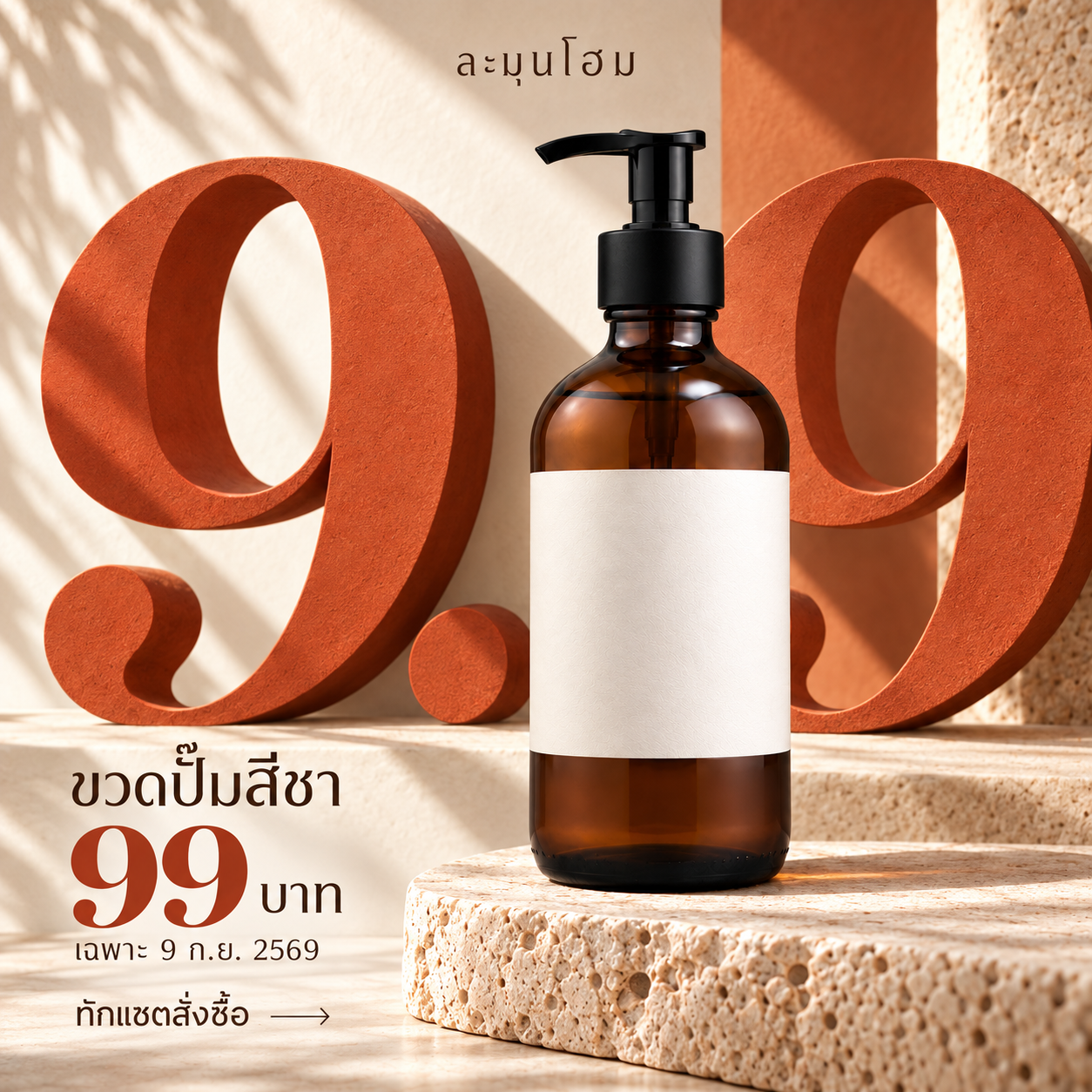
ละมุนโฮม ขวดปั๊มสีชา 99 บาท เฉพาะ 9 ก.ย. 2569 ราคาต่อชิ้น ไม่รวมค่าจัดส่ง ทักแชตสั่งซื้อ • แบรนด์และข้อเสนอสมมติ
ตัวอย่างผลลัพธ์
งานนี้ใช้ทำอะไร
ภาพโปรสินค้าแบบจัตุรัส
รูปสินค้าของคุณ
เตรียมรูปสินค้าหรือภาพถ่ายของคุณที่ยังไม่มีราคา โปรโมชัน หรือกราฟิกโฆษณา ไม่ใช้ภาพงานตัวอย่างแทนรูปสินค้าจริง
ภาพนี้ให้ดูแนวกราฟิกและการจัดวาง งานของคุณจะเปลี่ยนไปตามข้อมูลและรูปที่ใช้
เอาแนวนี้ไปใช้กับงานของคุณคำสั่งตัวอย่าง
ดู Prompt ตัวอย่าง แล้วปรับข้อมูลให้ตรงกับงานของคุณ
คำสั่งตัวอย่างใช้แก้ภาพที่มีอยู่แล้ว หากเริ่มงานใหม่ ให้ใส่ข้อมูลของคุณในช่องด้านล่าง
ดูคำสั่งเต็มที่ 1
Edit the referenced campaign GRAPHIC ART DIRECTION, retaining the same photoreal amber pump bottle, blank cream label, warm sunlight and stone material. Square1:1. Transform static left-text/right-product into a high-end creative homeware campaign: bottle enlarged centrally slightly right, enormous rust-orange sculptural serif "9.9" extends behind the bottle across the full width, partially occluded by the bottle but instantly readable as9.9. Two numeral forms feel like an architectural portal, strong dimensional cast shadows connect type, plinth and product. Bold scale interaction, physical depth, polished art-direction, not an infographic or PowerPoint slide. Small brand "ละมุนโฮม" top edge inside7% margin. Product name "ขวดปั๊มสีชา" sits in a short horizontal editorial lockup above lower-left offer; "99 บาท" clear compact single price lockup anchors lower left aligned to the plinth edge, not another huge competing9.9. Small CTA "ทักแชตสั่งซื้อ" follows same compositional baseline. Exact text also "9 ก.ย. 2569" once. Shipping/per-unit terms will be in caption; remove them from art. Original amber bottle details should remain credible, not warped. No icons, no brush, no sticker badges, no stacked text boxes, no new products, no claims, no DEMO/test. Restrained editorial tension and shadow, not empty minimalism. All Thai correct; important text7% safe edges. One finished commercial artwork.
ใส่รูปและข้อมูลของคุณ เพื่อปรับคำสั่งให้ตรงกับงานที่จะทำ
สร้างคำสั่งของฉัน
เอาแนวนี้ไปใช้กับงานของคุณ
ใส่ข้อมูลเท่าที่มี เดี๋ยว KlangPrompt จัดคำสั่งให้
 ChatGPT
 Claude
 Gemini
ก่อนนำไปใช้
เปลี่ยนชื่อ ข้อความ ราคาและวันเวลาให้ตรงกับงานจริง ตรวจภาษาไทยและภาพทุกครั้ง แบรนด์และข้อมูลตัวอย่างเป็นข้อมูลสมมติ ไม่ใช่ข้อมูลลูกค้าจริง หากใช้สินค้าของคุณ ให้ตรวจโลโก้ ฉลาก สีและรูปทรงเทียบกับต้นฉบับก่อนโพสต์
ดูตัวอย่างอื่นในหมวดนี้ →เริ่มใช้ใน 3 ขั้น
- ดูตัวอย่าง แล้วใส่ข้อมูลของคุณในช่องปรับคำสั่ง
- คัดลอกคำสั่ง แล้วเปิด ChatGPT, Claude หรือ Gemini
- แนบรูปที่ต้องใช้ วางคำสั่ง แล้วตรวจภาพและข้อความก่อนนำไปโพสต์
แต่งภาพต่อใน Canva
ดาวน์โหลดภาพจาก AI ที่คุณใช้ แล้วอัปโหลดเข้า Canva เพื่อเพิ่มโลโก้ แก้ข้อความ หรือจัดขนาดด้วยตัวเอง
เปิด Canva →